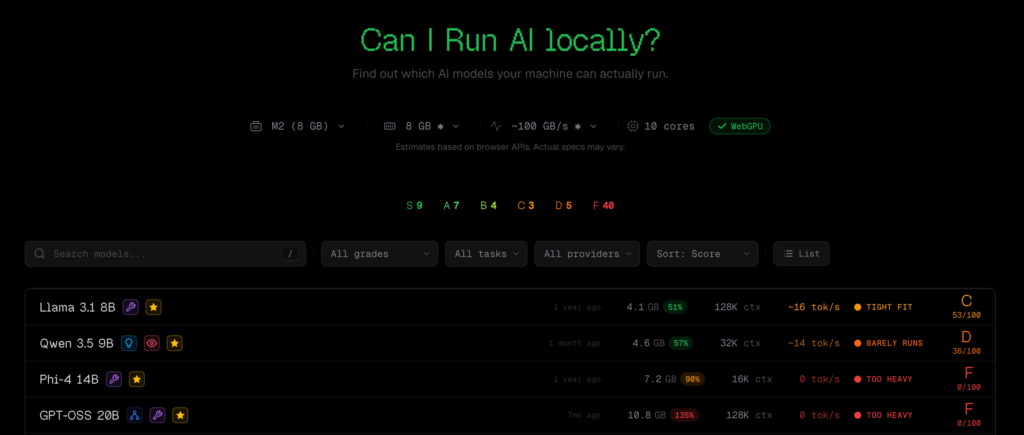
AI Tool CanIRun.ai can automatically detect user hardware specifications through the browser, estimate which LLM models can run and their inference speeds, and present the results with ratings from S to F. Interested users can give it a try to learn more.
(Background: Clawdbot, a 24/7 AI butler that sold out Mac minis)
(Additional info: Don’t blindly follow OpenClaw; Xiaolongxia AI is powerful but may not suit you)
Table of Contents
Toggle
- The small flaws of CanIRun.ai
- Command-line alternative llmfit
- What the community most wants
Do you want to install large language models (LLMs) locally? The most common beginner question is: What models can my computer run? This article introduces a recently discussed tool on Hacker News: CanIRun.ai.
CanIRun.ai is a web-only tool with a simple operation: open your browser, and it will automatically detect your GPU model and memory specs via the WebGPU API. Based on model parameters, quantization levels (Q4_K_M, Q8_0, F16, etc.), and memory bandwidth, it estimates each model’s runability and inference speed (tokens/sec), presenting results rated from S to F.
It covers from ultra-light models with 0.8B parameters to giant MoE (Mixture of Experts) models with 1T parameters, sourcing data from mainstream local inference tools like llama.cpp, Ollama, and LM Studio.
The small flaws of CanIRun.ai
While the concept has been well received, there are some criticisms, mainly about incomplete hardware coverage and discrepancies between estimated and actual performance.
The most frequently mentioned issue is missing hardware support. For example, RTX Pro 6000, RTX 5060 Ti 16GB, various laptop GPUs are not listed. Apple chips are included but only up to 192GB of memory; in reality, M3 Ultra supports up to 512GB.
Regarding estimation accuracy, some users found their real-world results didn’t match CanIRun.ai’s predictions. Cases where a model runs fine but the website says it can’t are repeatedly discussed, leading some users to ignore the tool altogether.
Although there’s room for improvement, for beginners, it still provides a quick way to check their device’s capabilities.
Command-line alternative llmfit
Additionally, some in the community recommend an alternative tool, llmfit: a command-line program that directly calls system tools (including nvidia-smi) to obtain precise GPU info, without relying on browser APIs. Many find it more practical and accurate than the web version.
However, llmfit also raises another topic: some users are surprised that it can accurately identify GPU models without requesting explicit permissions. This touches on privacy concerns about browser fingerprinting and hardware data collection: if a web tool can detect your graphics card via WebGPU, how is that data used?
Some suggest that such functionality would be best integrated into Ollama, allowing users to automatically filter available models based on their hardware directly from the command line, saving manual research.
What the community most wants
Based on feedback, CanIRun.ai’s main limitations are not just accuracy but also the narrow scope of evaluation. Users mainly want to know: Which model offers the best quality and acceptable speed on my hardware? Currently, the tool only answers “Can it run?” but not “Is it good enough?”
The community hopes future updates will include benchmark scores for models, combined with hardware estimates, to provide a more comprehensive decision basis. Other technical improvements include: supporting CPU memory sharing (allowing GPUs with limited memory to borrow system RAM), enabling KV cache offloading, and fixing MoE model calculation logic.
Overall, the direction of the tool is correct, and market demand exists: for most users, the barrier to local AI is still high, and quickly assessing “What can my machine run?” is a real need. CanIRun.ai addresses this pain point but still needs refinement.
Disclaimer: The information on this page may come from third parties and does not represent the views or opinions of Gate. The content displayed on this page is for reference only and does not constitute any financial, investment, or legal advice. Gate does not guarantee the accuracy or completeness of the information and shall not be liable for any losses arising from the use of this information. Virtual asset investments carry high risks and are subject to significant price volatility. You may lose all of your invested principal. Please fully understand the relevant risks and make prudent decisions based on your own financial situation and risk tolerance. For details, please refer to
Disclaimer.


