


Сфера застосування
Ця інструкція стосується Gate Web
Перед початком: Переконайтеся, що у вашому акаунті Gate є активи та ви пройшли необхідні перевірки безпеки (платіжний пароль, SMS, Google Authenticator)
Орієнтовний час: 5 хв
Мета
Ця інструкція допоможе вам здійснити виведення активів за допомогою Gate Code, а також поповнити рахунок, активувавши Gate Code на Gate Web.
Кроки
Крок 1: Перейдіть на сторінку виведення через Gate Code
- Увійдіть у свій акаунт Gate.
- Перейдіть у розділ «Активи» – «Управління коштами» – «Вивести» – «Внутрішній» – «Gate Code».
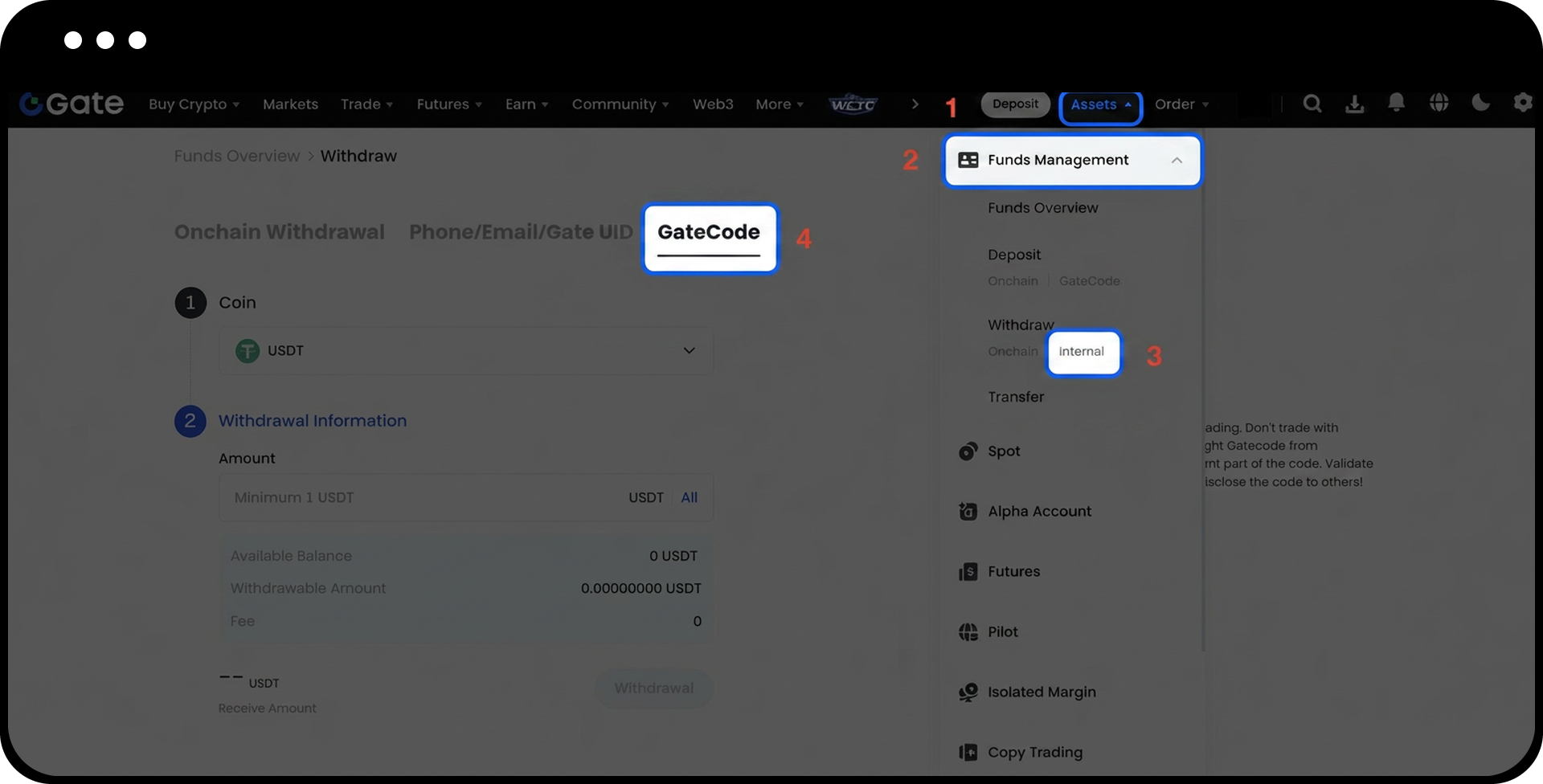
Крок 2: Створіть Gate Code для виведення
- Введіть суму для виведення у відповідне поле.
- Натисніть «Далі», потім «Підтвердити».
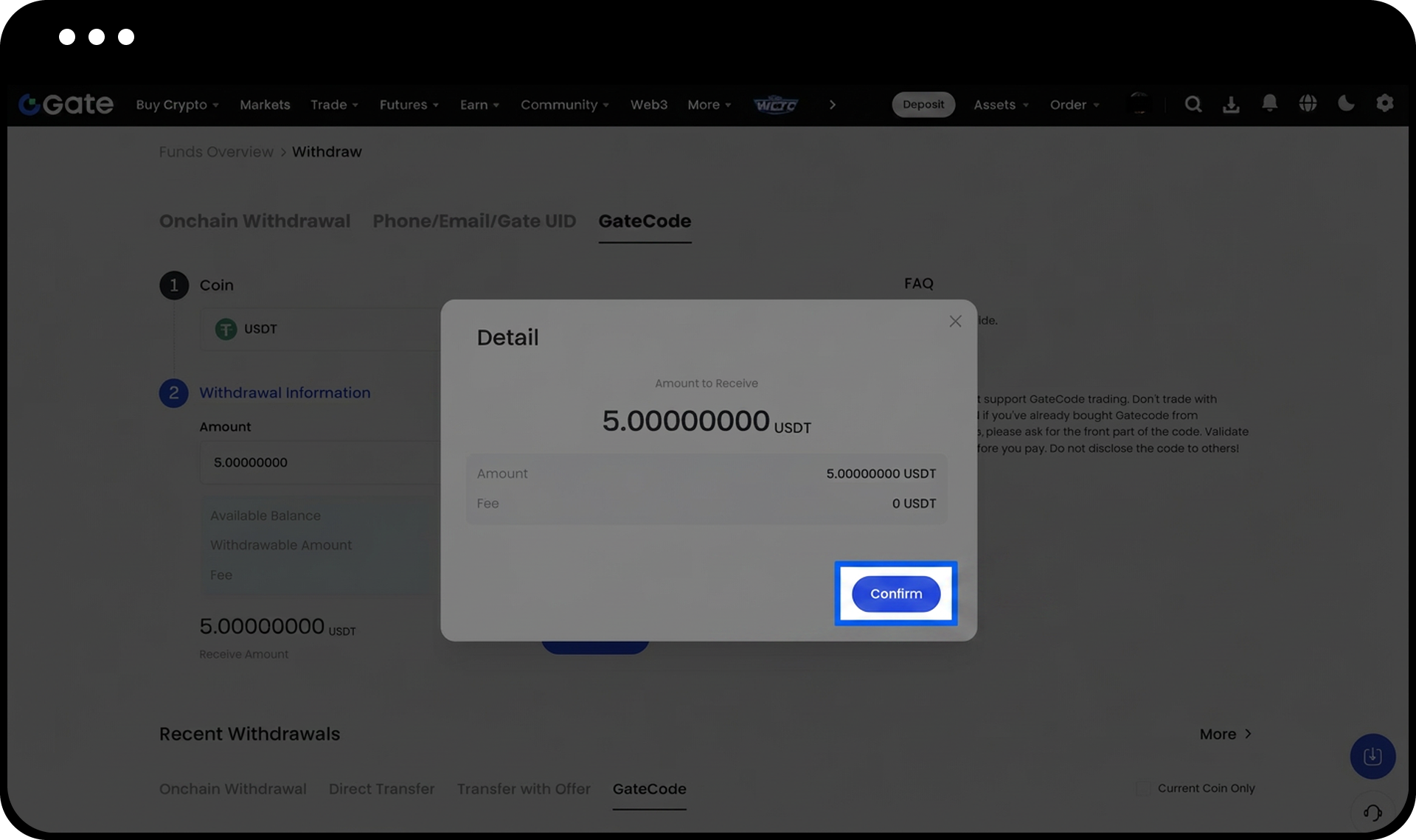
Крок 3: Пройдіть перевірку безпеки
- Уважно перевірте всю інформацію щодо виведення.
- Введіть свій платіжний пароль, SMS-код та код Google Authenticator.
- Натисніть «Підтвердити», щоб продовжити.
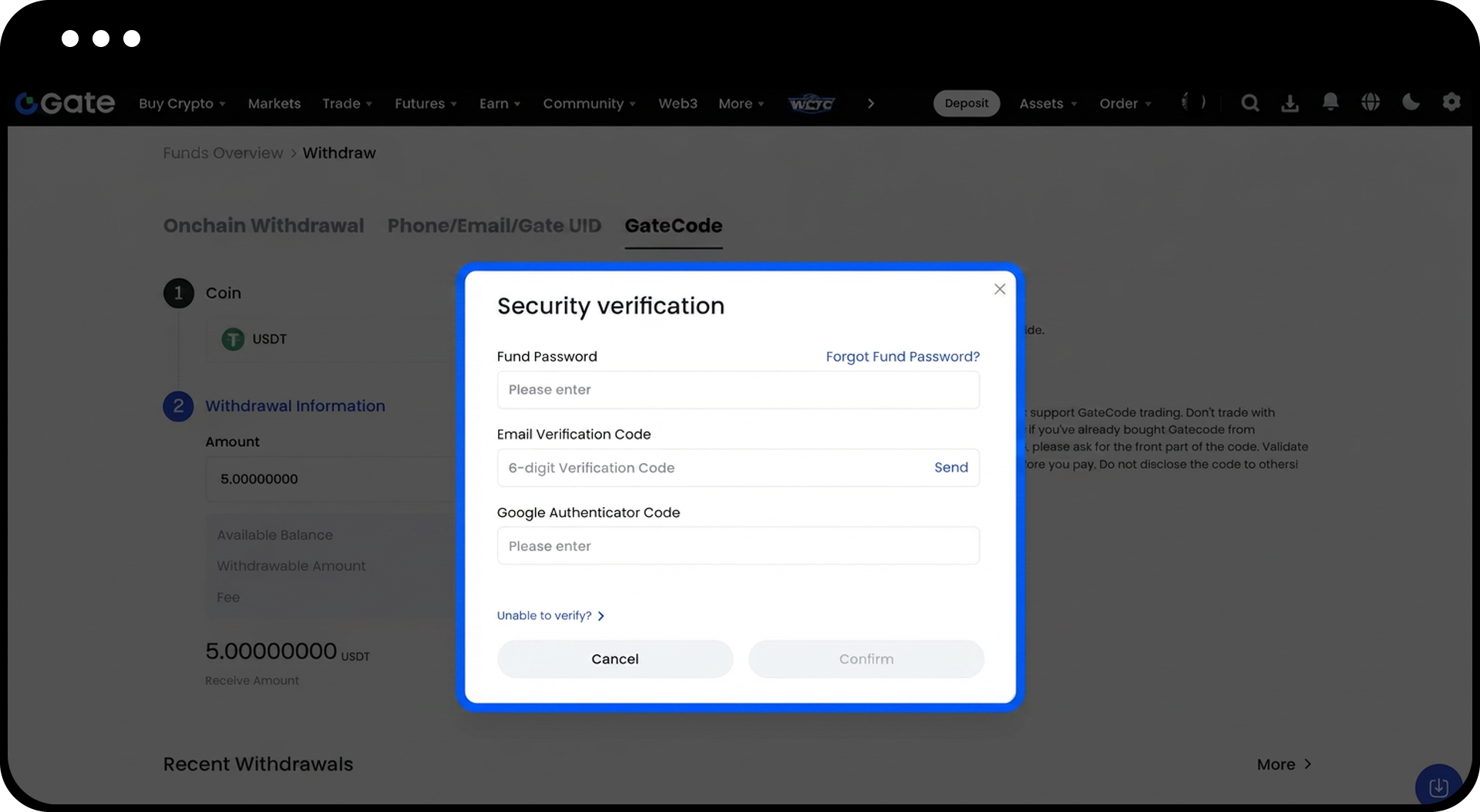
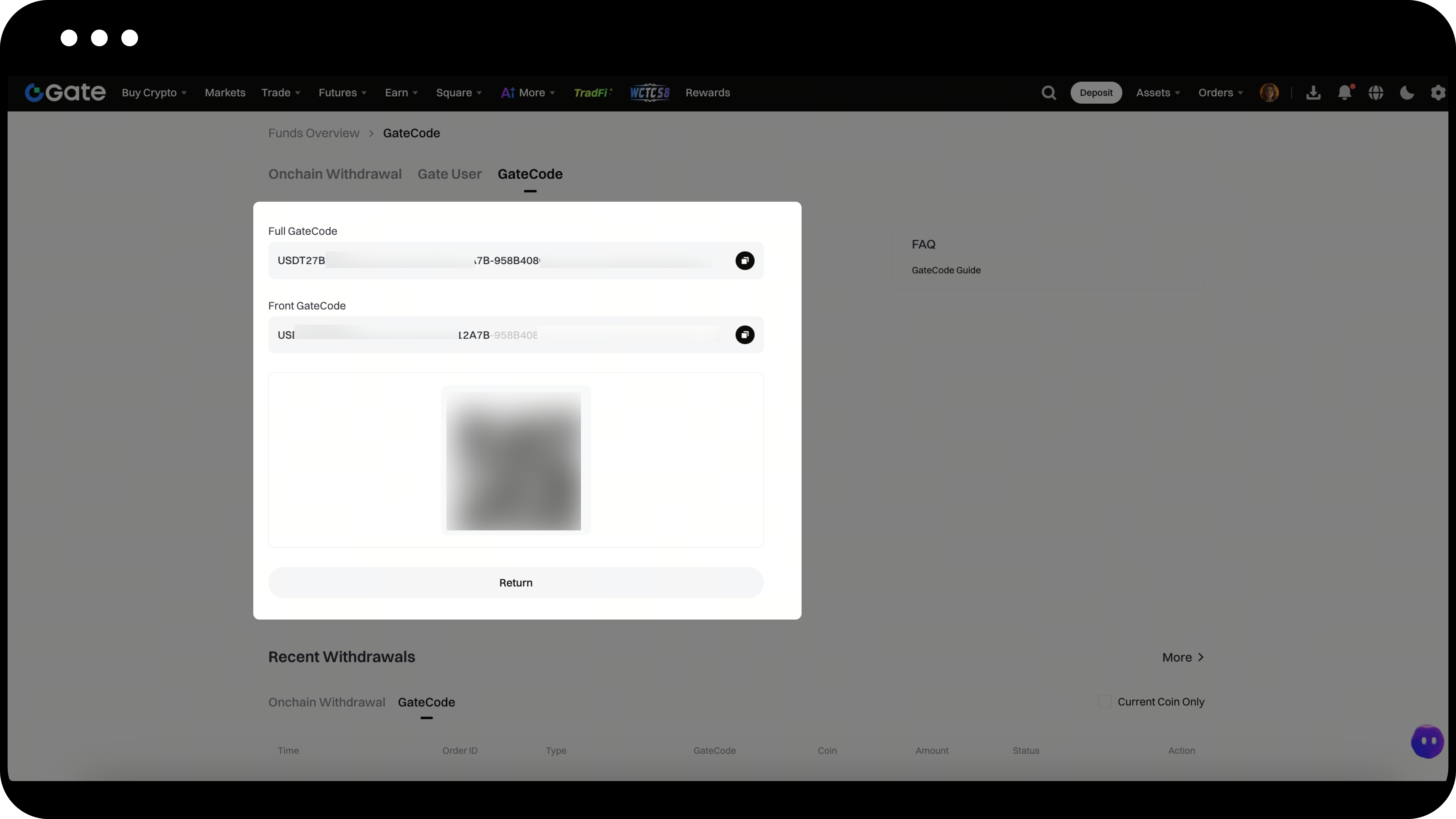
Крок 4: Збережіть або скопіюйте Gate Code
- Після завершення виведення з’явиться спливаюче вікно з вашим Gate Code.
- Виберіть один із варіантів:
- Збережіть Gate Code як зображення QR-коду
- Натисніть іконку копіювання, щоб скопіювати Gate Code
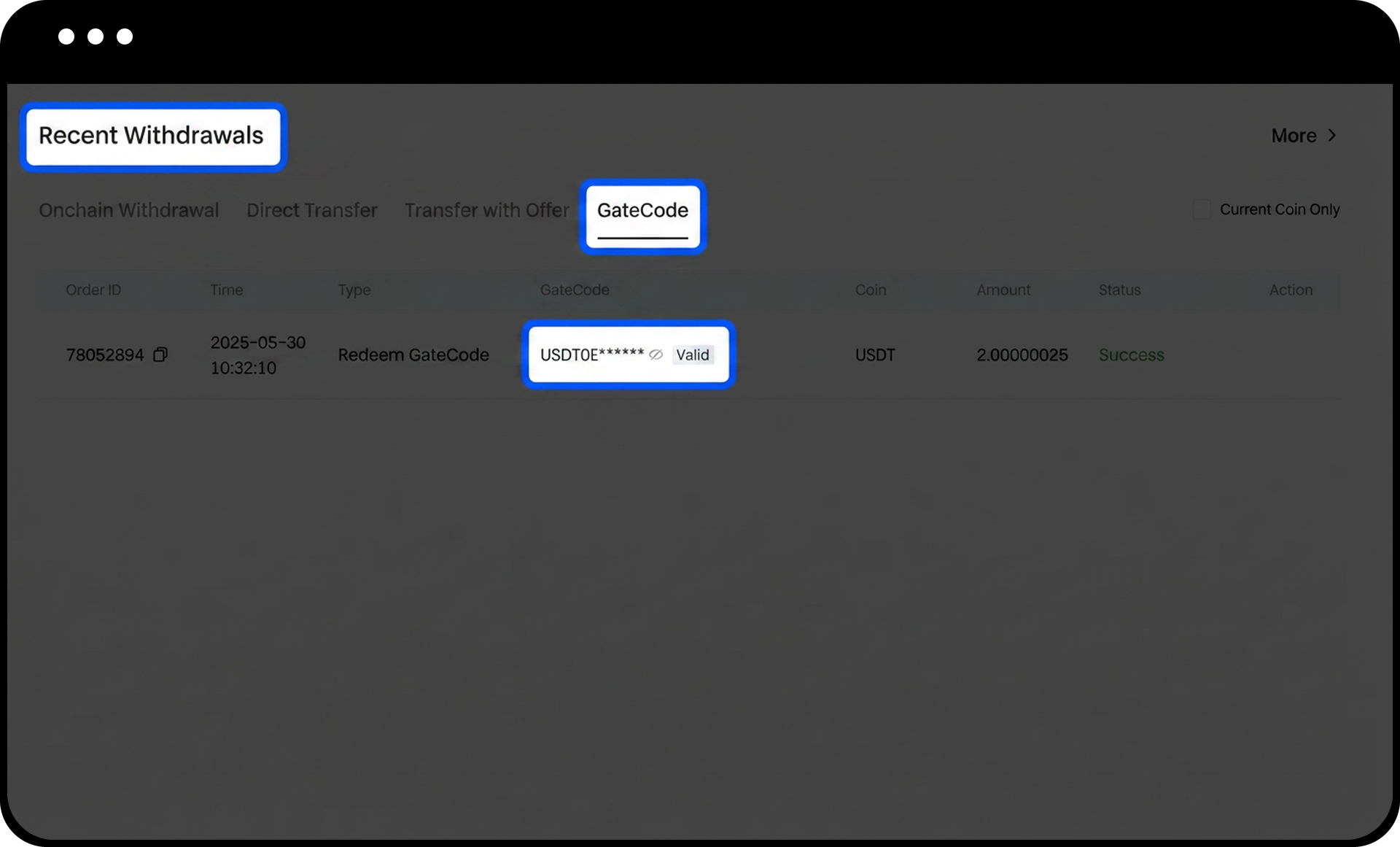
Крок 5: Перегляд Gate Code з історії виведень (альтернативний спосіб)
- Перейдіть на сторінку «Останні виведення».
- Натисніть іконку перегляду поруч із адресою вашого запису про виведення.
- Введіть платіжний пароль, коли буде запропоновано, щоб побачити повний Gate Code.
Крок 6: Перейдіть на сторінку поповнення через Gate Code
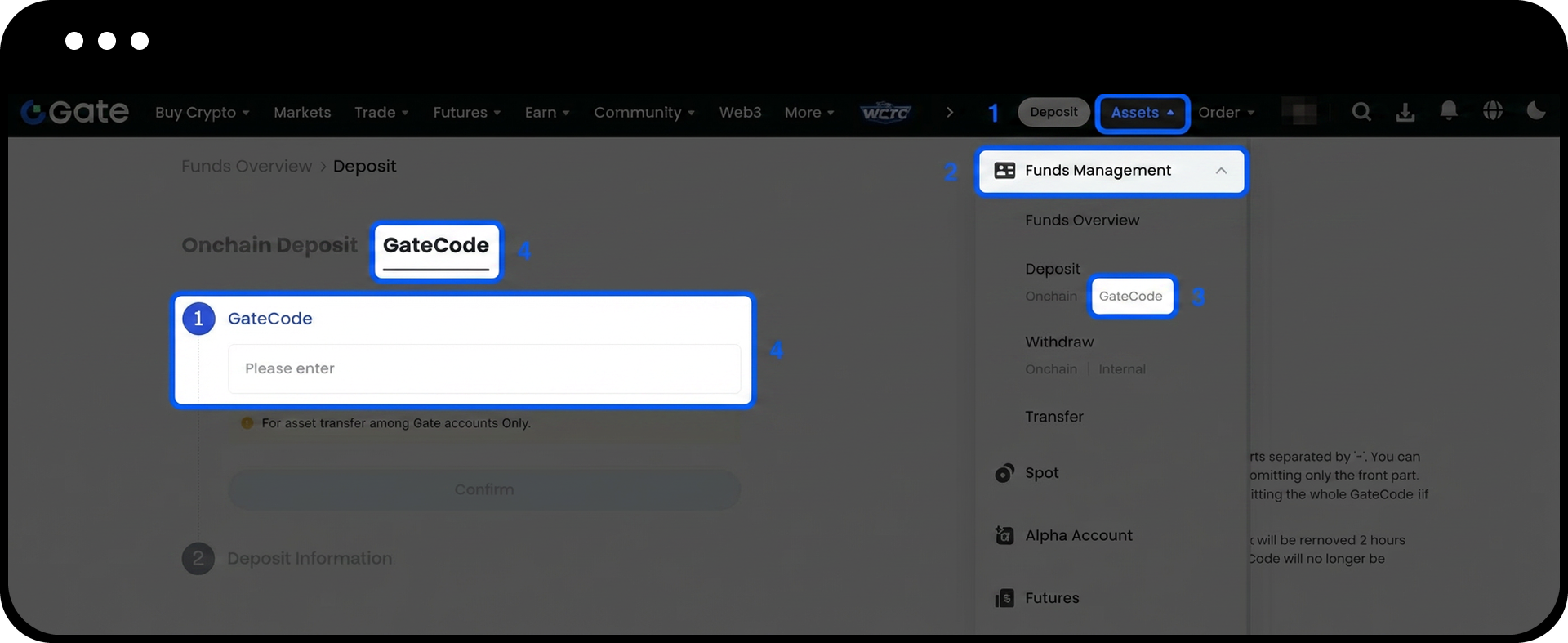
- Увійдіть у свій акаунт Gate.
- Перейдіть у розділ «Активи» – «Управління коштами» – «Поповнити» – «Gate Code».
Крок 7: Активуйте Gate Code
- Введіть або вставте повний Gate Code у відповідне поле.
- Натисніть «Підтвердити», щоб відправити код.
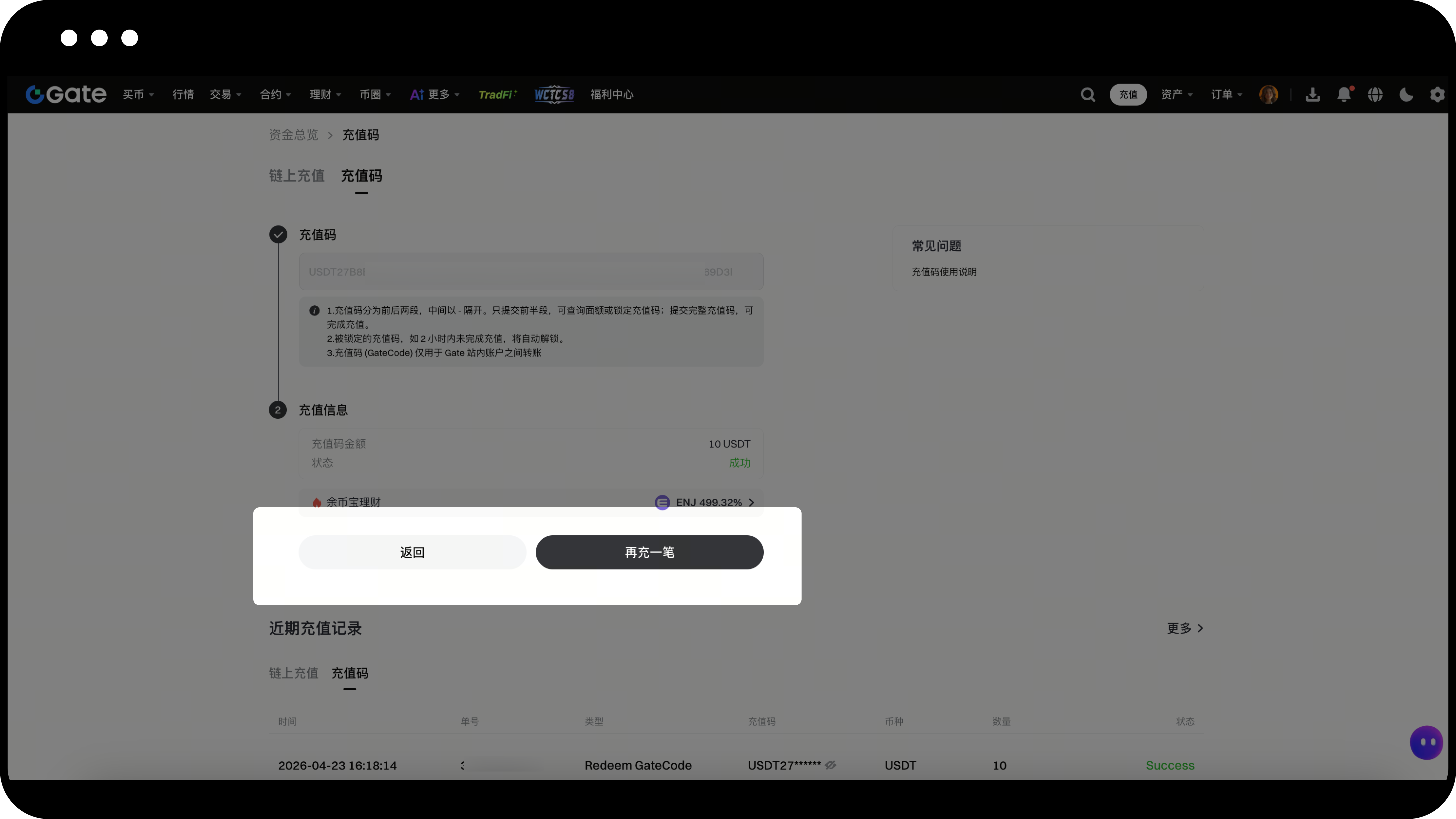
- З’явиться інформація про успішне поповнення.
- Ви можете повернутися на попередню сторінку або здійснити ще одне поповнення.
Примітки
- Перекази через Gate Code між акаунтами Gate виконуються миттєво та без комісії.
- Gate Code складається з двох частин, розділених дефісом. Перша частина використовується для перевірки номіналу або блокування коду, а для завершення поповнення потрібен повний код.
- Якщо Gate Code не буде активовано протягом 2 годин після блокування, він автоматично розблокується і захист припиниться.
- Завжди перевіряйте особу людини, з якою ділитеся Gate Code, перед здійсненням будь-яких переказів.
- Gate не надає офіційних торгових каналів для Gate Code. Будьте вкрай обережні, розглядаючи операції з Gate Code з іншими користувачами.
FAQ
Q1: Що таке Gate Code і як він працює?
A: Gate Code — це спосіб переказу, який дозволяє користувачам миттєво та без комісій переводити активи між акаунтами Gate. Відправник генерує унікальний код під час виведення, а отримувач активує цей код на сторінці поповнення для отримання активів.
Q2: Чи можу я скасувати Gate Code після його створення?
A: Після створення Gate Code скасувати його напряму не можна. Проте, якщо код не буде активовано протягом 2 годин після блокування, він автоматично розблокується. Щоб повернути кошти з неактивованого Gate Code, потрібно самостійно активувати його через функцію поповнення.
Q3: Що робити, якщо я втратив Gate Code?
A: Ви можете відновити свій Gate Code на сторінці «Останні виведення», натиснувши іконку перегляду поруч із відповідним записом. Для перегляду повного Gate Code потрібно ввести платіжний пароль.
Q4: Чи безпечно торгувати Gate Code з незнайомцями?
A: Ні, торгувати Gate Code з незнайомцями не рекомендується. Gate не надає офіційних торгових каналів для Gate Code, а такі операції несуть значний ризик шахрайства. Діліться Gate Code лише з перевіреними та довіреними особами.
Q5: Як перевірити Gate Code перед тим, як приймати його як оплату?
A: Ви можете перевірити та заблокувати Gate Code, ввівши його першу частину (до дефіса) на сторінці поповнення. Це дозволяє перевірити номінал перед отриманням повного коду. Переходьте до оплати лише після успішного блокування Gate Code.
Відмова від відповідальності
Наданий тут зміст призначений лише для ознайомлення та освітніх цілей і не є фінансовою, інвестиційною, торговою чи юридичною порадою, а також не є пропозицією або закликом купувати чи продавати будь-які цифрові активи. Gate не надає жодних прямих чи непрямих заяв або гарантій щодо точності, повноти чи актуальності інформації, що міститься тут. Функціонал продукту, інтерфейси, правила та структура комісій можуть оновлюватися або змінюватися у будь-який час. Для отримання найактуальнішої інформації звертайтеся до останніх оголошень і фактичних даних, що відображаються на платформі Gate.
Інвестиції в цифрові активи пов'язані зі значними ризиками, а ціни можуть суттєво коливатися. Ви можете втратити всю суму своїх інвестицій. Приймайте рішення обережно, враховуючи власний фінансовий стан і рівень толерантності до ризику після повного розуміння супутніх ризиків. За потреби рекомендується звернутися до незалежного професійного фінансового чи юридичного радника.
Щоб отримати додаткову інформацію про потенційні ризики, зверніться до Розкриття інформації про ризики та Угоди користувача Gate.
