


Ámbito de aplicación
Esta guía se aplica a Gate Web
Antes de empezar: Asegúrate de que todas las transacciones estén liquidadas y que tu cuenta no tenga órdenes pendientes ni disputas sin resolver
Tiempo estimado: 5 minutos
Objetivo
Esta guía te explicará cómo enviar una solicitud de salida del estado de comerciante P2P y completar el proceso de salida en Gate Web.
Pasos
Paso 1: Accede al Portal de Salida de Comerciante P2P
- Ve al Centro de Usuario P2P.
- Accede a Configuración.
- Selecciona "Salida de Comerciante P2P".
Paso 2: Envía la Solicitud de Salida
- Haz clic para solicitar la salida como comerciante.
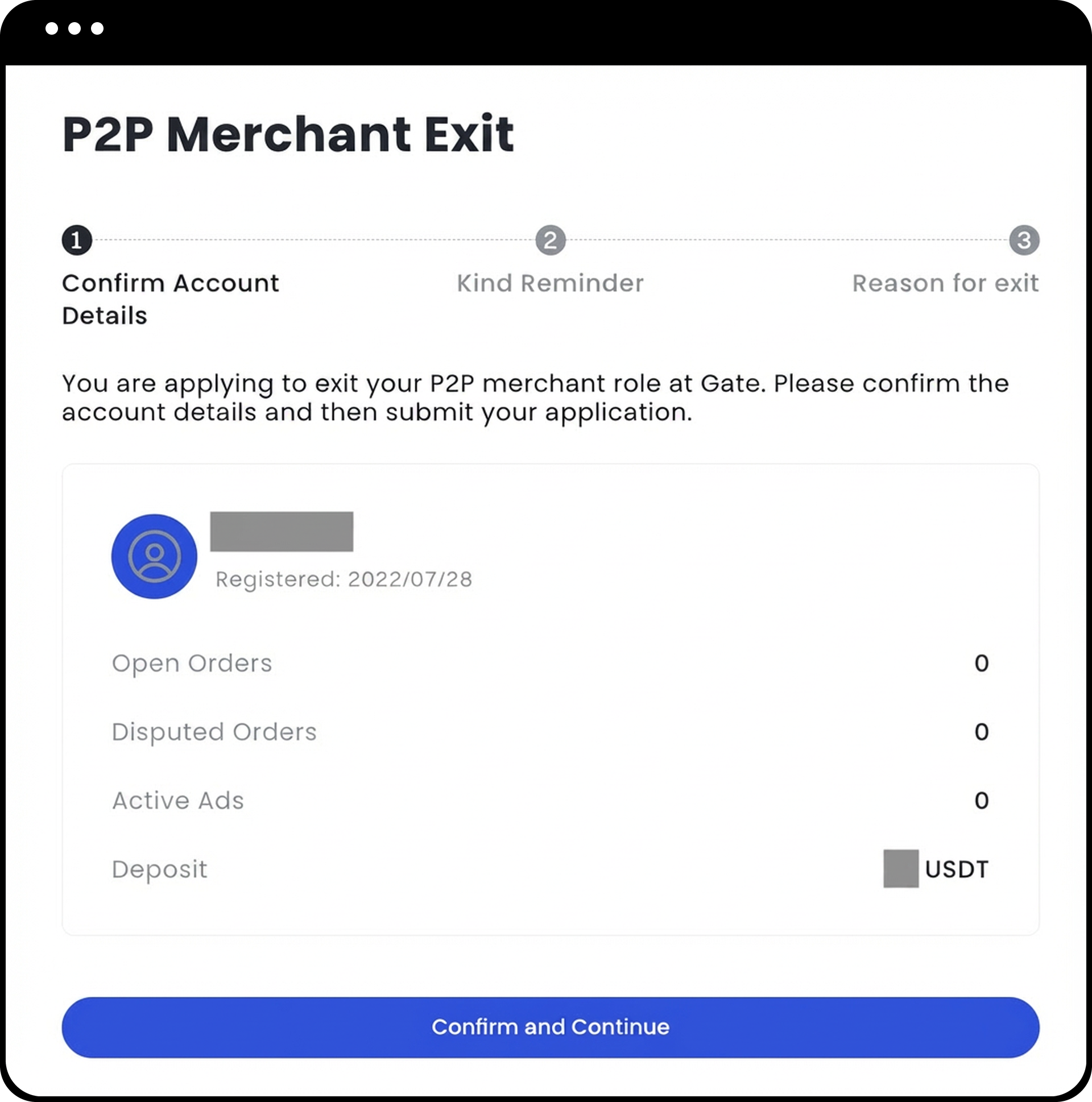
- El sistema comprobará automáticamente en tu cuenta:
- Órdenes abiertas
- Disputas pendientes
- Anuncios activos
- Revisa la información sobre el proceso de salida que aparece en la página.
- Haz clic en "Confirmar y Continuar" para pasar al siguiente paso.
Paso 3: Selecciona el Motivo de Salida
Elige el motivo por el que deseas salir entre las siguientes opciones:
- Ya no deseo participar en el trading P2P, aunque podría volver en el futuro.
- Me gustaría seguir operando en P2P, pero necesito desbloquear mis fondos ahora.
- Necesito salir por una emergencia personal.
- Estoy insatisfecho con los servicios de la plataforma y planeo irme.
- Otros motivos [Por favor, especifica].
Paso 4: Confirma el Envío de la Solicitud de Salida
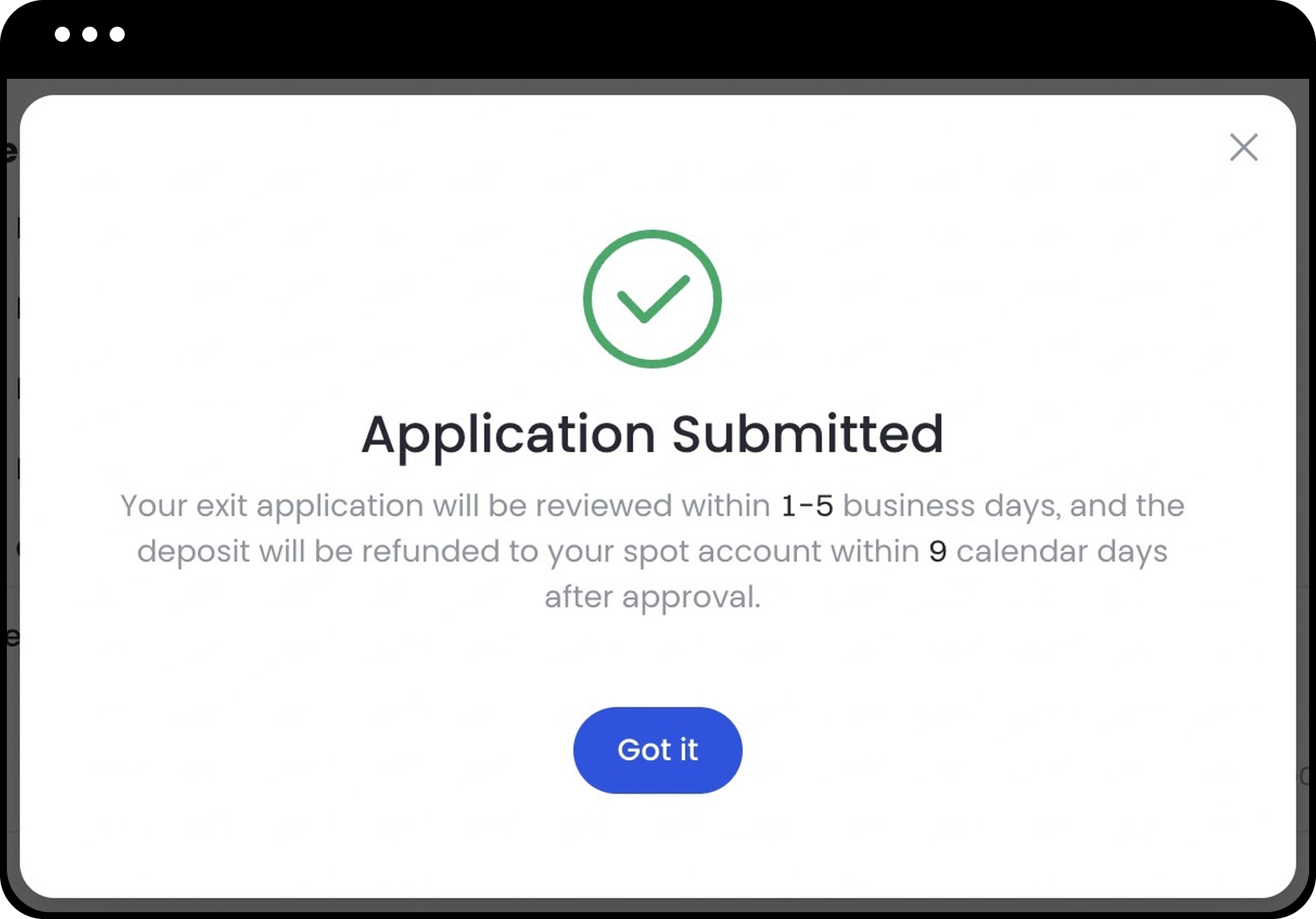
Después de seleccionar el motivo, aparecerá una ventana emergente confirmando que tu solicitud se ha enviado correctamente.
Paso 5: Supervisa el Progreso de la Salida
El estado de tu solicitud se actualizará a uno de los siguientes:
- Pendiente de Revisión: Se espera que la revisión se complete en 1-5 días laborables. Durante este estado, no podrás publicar nuevos anuncios.
- Salida en Proceso: Consulta la fecha estimada de finalización y los detalles de la devolución del depósito.
- Revisión Fallida: Puedes volver a iniciar el proceso de solicitud de salida desde este estado.
Paso 6: Cancela la Solicitud de Salida (Opcional)
Si tu estado es "Pendiente de Revisión", puedes:
- Cancelar tu solicitud de salida.
- Restaurar tu estado de comerciante.
- Seguir publicando anuncios.
Notas
- Si has depositado un fondo de seguridad como comerciante, el depósito se reembolsará mediante el método de pago original una vez aprobada la solicitud de salida. El tiempo de procesamiento del reembolso puede variar según las circunstancias.
- Si tu cuenta presenta algún problema de riesgo o irregularidad, el Gestor P2P te ayudará a resolverlo antes de tramitar tu solicitud de salida.
- Una vez aprobada la solicitud de salida, se eliminarán tus privilegios de comerciante y tu cuenta volverá al estado de usuario estándar.
- Para más información sobre los depósitos de seguridad, consulta: Preguntas frecuentes sobre el depósito de seguridad.
Preguntas frecuentes
P1: ¿Cuánto tiempo tarda en procesarse mi solicitud de salida?
R: El proceso de revisión suele tardar entre 1 y 5 días laborables. Una vez aprobada, se tramitará la salida y, si corresponde, el depósito de seguridad se reembolsará mediante el método de pago original.
P2: ¿Por qué se ha rechazado mi solicitud de salida?
R: Los motivos más comunes de rechazo son órdenes sin resolver, disputas pendientes, anuncios activos o problemas de riesgo en la cuenta. Si tu solicitud sigue siendo rechazada tras volver a enviarla, ponte en contacto con el Soporte de Atención al Cliente para recibir ayuda adicional.
P3: ¿Puedo volver a ser comerciante después de salir?
R: Sí, puedes volver a solicitar el estado de comerciante en el futuro siguiendo el proceso estándar de solicitud.
P4: ¿Qué ocurre con mi depósito de seguridad tras salir?
R: Si depositaste un fondo de seguridad, se reembolsará mediante el método de pago original una vez aprobada tu solicitud de salida. El tiempo de procesamiento del reembolso puede variar según las circunstancias.
P5: ¿Puedo seguir operando en P2P tras salir del estado de comerciante?
R: Sí, salir del estado de comerciante solo elimina tus privilegios como tal. Tu cuenta volverá al estado de usuario estándar y podrás seguir comprando y vendiendo como usuario P2P habitual.
Descargo de responsabilidad
El contenido aquí proporcionado es solo para fines de referencia y educativos, y no constituye asesoramiento financiero, de inversión, comercial ni legal, ni constituye una oferta o solicitud para comprar o vender activos digitales. Gate no realiza declaraciones ni garantías, expresas o implícitas, sobre la exactitud, integridad o actualidad de la información contenida en este documento. Las características del producto, interfaces, normas y estructuras de tarifas pueden actualizarse o modificarse en cualquier momento. Consulta los comunicados más recientes y la información que aparece en la plataforma de Gate para obtener los detalles más precisos.
Las inversiones en activos digitales implican un riesgo significativo y los precios pueden fluctuar considerablemente. Podrías perder la totalidad de tu inversión. Toma decisiones con cautela en función de tu situación financiera y tolerancia al riesgo, una vez que hayas comprendido plenamente los riesgos asociados. Si es necesario, te recomendamos consultar con un asesor financiero o legal independiente.
Para más información sobre los posibles riesgos, consulta la Divulgación de riesgos y el Acuerdo de usuario de Gate.
